> For the complete documentation index, see [llms.txt](https://messier.gitbook.io/catalogue-de-messier/llms.txt). Markdown versions of documentation pages are available by appending `.md` to page URLs; this page is available as [Markdown](https://messier.gitbook.io/catalogue-de-messier/messier-applications/p2p-exchange/route-to-dex-fallback.md).
# Route to DEX (Fallback)
**DEX Fallback** is Messier P2P’s smart routing system that ensures your order gets completed even when peer-to-peer (P2P) liquidity is unavailable or insufficient.
Rather than canceling an unfilled or partially filled order, Messier either automatically or manually routes the remaining amount to a decentralized exchange, giving you the best chance to complete your trade efficiently and securely.
***
### Key Benefits
* Automatically routes unfilled amounts to DEXes
* Aggregates DEX liquidity for optimal pricing
* Gives users full control over fallback settings such as slippage, fallback timing, and auto-retry
***
### When to Use DEX Fallback
* Your P2P order is only partially filled
* The order is taking too long to complete via peer matches
* You want full execution without having to cancel and relist
* You prefer not to manually intervene in the event of low liquidity
***
### Routing Modes Comparison
| Mode | Applies To | Peer Priority | DEX Execution Timing | User Control |
| --------------------------------- | ------------------ | ------------- | ---------------------- | ------------ |
| P2P → DEX Fallback | Spot, Limit | Yes | Delayed (timed/manual) | Medium |
| P2P → DEX Direct Fill | Spot only | Yes | Immediate | Low |
| Marketplace → Manual Route to DEX | Marketplace Orders | Yes | On user action | High |
***
## How to Use DEX Fallback – Three Scenarios
### 1. Spot Order with P2P → DEX Fallback
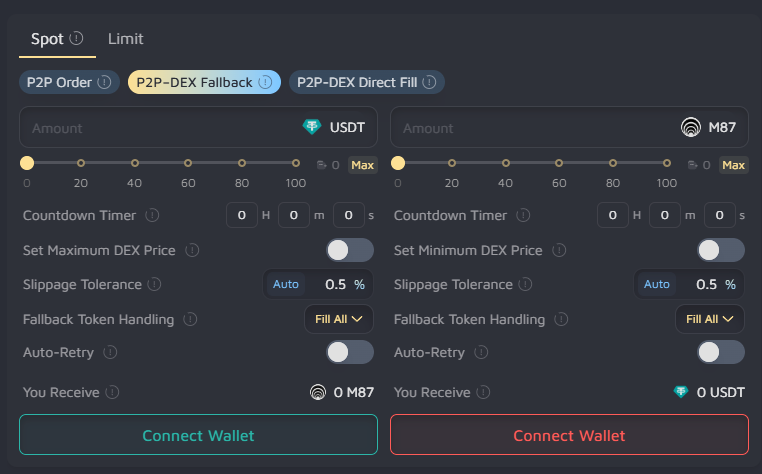
Begin with a P2P trade. If the order is not fully filled within the configured time or conditions, the remaining portion is routed to a DEX automatically.
#### Use Case:
You want to prioritize better peer pricing but want fallback protection in case liquidity is low.
#### Steps:
1. Navigate to the **Spot** tab.
2. Select the **P2P → DEX Fallback** option.
3. Enter the desired trade amount.
4. Configure the fallback settings:
* Countdown Timer: Delay before fallback is triggered
* Slippage Tolerance: Set manually or use Auto mode
* Fallback Handling: Choose to fill all or partial
* Auto-Retry: Optionally retry fallback if it fails
5. Click **Buy** or **Sell** to submit the trade.
#### What Happens:
Your order is listed on the P2P layer. If it isn't completely filled, Messier will automatically route the unfilled portion to a DEX based on your configured parameters.
***
### 2. Spot Order with P2P → DEX Direct Fill
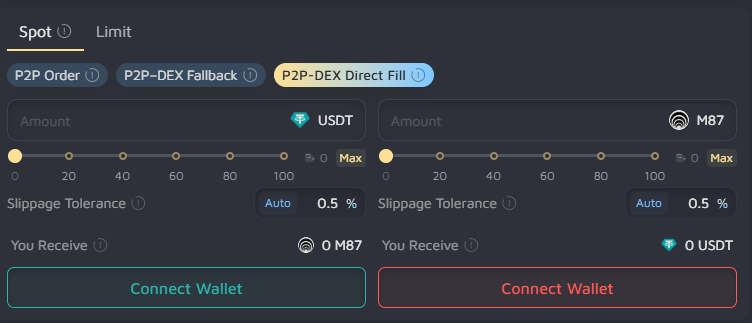
If the order cannot be fully matched on the P2P layer during the same transaction, any remaining portion is immediately routed to a DEX and filled in real-time.
#### Use Case:
You require full execution without delay and are willing to rely on DEX liquidity for the unfilled amount.
#### Steps:
1. Go to the **Spot** tab.
2. Select the **P2P → DEX Direct Fill** option.
3. Input the amount you wish to trade.
4. Set the slippage tolerance (Auto or manual).
5. Click **Buy** or **Sell** to execute the order.
#### What Happens:
The order attempts to match with peer liquidity. Any unmatched portion is directly routed to the DEX in the same transaction, without waiting or retries.
**Note:** This routing option is exclusive to **Spot orders** and does not support limit pricing or delayed fallback.
***
### 3. Marketplace Order → Manual Route to DEX
Create a P2P order via the marketplace interface. If the order remains unfilled or partially filled, you can manually route the remaining amount to a DEX at any time.
#### Use Case:
You want full control over routing behavior and only want to use DEX as a fallback if the peer market doesn’t respond.
#### Steps:
1. Navigate to the **Marketplace** tab.
2. Click **Create Order** and select your token pair and amount.
3. Enable **Smart Defaults** to activate Adaptive Market Pricing and MultiSwap.
4. Submit your order.
After submission:\
5\. Go to the **My Orders** tab.\
6\. Locate the order you wish to route.\
7\. Click **Route to DEX**.\
8\. Choose between Auto or Manual slippage.\
9\. Confirm the transaction.
#### What Happens:
Messier uses its smart routing engine to aggregate DEX liquidity and fulfill the trade at the best possible rate. The order will show as completed in your order history, and tokens will be available under the wallet tab.\
\
With fallback logic built directly into both **Spot** and **Limit** workflows, users can trade confidently knowing that every order has a clear path to completion even when market conditions are volatile or peer liquidity is temporarily limited.